Multisim Live Shuts Down September 15, 2026 — Best Free Alternatives, Compared
National Instruments and Digilent have confirmed Multisim Live's end-of-life. Monthly subscriptions stopped renewing August 1, 2026, and the platform goes fully dark on September 15, 2026 — with no guarantee your saved circuits survive past that date. This guide covers exactly how to export your work, then an honest comparison of where to go next, based on actually using each tool rather than reading their marketing pages.
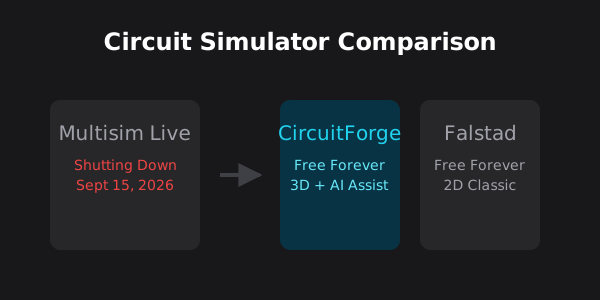
Who this actually affects
Two groups are going to feel this most:
1. Students and educators on Chromebooks or Macs. If your course depends on a no-install, browser-based simulator, this shutdown breaks that toolchain mid-semester — NI's official replacement, Multisim Desktop, is Windows-only. 2. Anyone with unsaved or unexported circuit work still sitting in a Multisim Live workspace. Digilent has been explicit that continued access to saved designs is not guaranteed after September 15 — there is no stated grace period once the platform goes dark.
The exact shutdown timeline
The dates are fixed, not tentative:
- August 1, 2026 — new monthly subscriptions stopped being sold; yearly subscriptions had already been withdrawn before that. - September 15, 2026 — Multisim Live is fully retired. Digilent does not guarantee continued access to any saved designs after this date. - Digilent's own courtesy-access offer for NI Circuit Design Suite (the desktop replacement) runs only until October 1, 2026 for existing subscribers.
If you've been telling yourself you'll back up your circuits "eventually," this is the point where that stops being a safe bet.
Phase 1: Export your circuits now
Do this before the deadline, not during the final week — server load typically spikes as shutdown dates approach, and an outage in the last few days could lock your files for good.
Go to multisim.com and open "My Circuits" while your account is still active.
For every circuit you want to keep, open it and use Export to get the native format (typically .msjs or .ms14 depending on your plan). A screenshot is not enough — you need the actual netlist data to rebuild the circuit anywhere else.
If you added custom components or manufacturer SPICE models, confirm whether they download with the circuit file. Digilent's own migration notes mention some metadata, including comments, does not always transfer cleanly — copy any custom SPICE directives into a text file as a backup.
Phase 2: The official migration path, and why it may not fit
NI's recommended path is Multisim Desktop, part of the NI Circuit Design Suite. Before you plan around it, know the real constraints:
- It only runs on Windows Mac users need Parallels or Boot Camp, neither of which works on Apple Silicon Macs. Chromebook users have no path to it at all.
- It's a paid professional suite Where Multisim Live had a workable free/low-cost tier, the desktop suite is priced for institutional or professional use — that accessible tier doesn't carry over.
- It's a heavy desktop install You lose the "open a browser tab anywhere" convenience that made Multisim Live useful for classroom and cross-device work in the first place.
Phase 3: Real browser-based alternatives, compared honestly
If what you actually need is a free, cross-platform, browser-based simulator — the specific niche Multisim Live occupied — three tools are worth real consideration. None of them is a perfect drop-in replacement, and the right pick depends on what you were using Multisim Live for.
| Tool | Free Tier Limit | Analysis Types | 3D View | Multisim Live Import | Best For |
|---|---|---|---|---|---|
| Falstad (CircuitJS1) | No limit | Transient, AC | No | No | Depth without hand-holding |
| CircuitForge | No limit | DC operating-point only | Yes | No | Visual learners, AI debugging |
| CircuitSim.com | 5 custom components | 7 types incl. transient, AC sweep | No | Yes (.msjs/.ms14) | Direct Multisim Live migration |
Free, open-source (GPLv2), no account required, runs entirely client-side. Includes real oscilloscope-style transient graphs (voltage/current over time) — genuine SPICE-adjacent depth that neither CircuitSim's free tier nor CircuitForge currently matches. Trade-off: the interface is dated, there's no 3D view, and a "Singular Matrix" error expects you to already understand circuit topology to debug it — it will not hold your hand.
Free, no account required to start. The only one of the three with real 3D component visualization and breadboard-style building, plus an AI assistant that names likely faults (a floating node, a missing ground) in plain language instead of surfacing a raw solver error. Trade-off, stated plainly: the solver currently handles DC operating-point analysis only — no transient or AC-sweep analysis yet, and no SPICE netlist import. If you need those, Falstad currently does this better.
A genuinely capable SPICE-based tool with 7 real analysis types (including transient and AC sweep) and a growing 3,000+ part library — and the only one of the three with a purpose-built importer for Multisim Live's own .msjs/.ms14 files. The free tier's real limit, confirmed by testing it directly rather than reading the pricing page alone, is 5 custom components per account — comfortable for a small demo circuit, a real constraint the moment you're building anything with more than a handful of non-stock parts. DC sweep and parameter sweep are paywalled behind the $2.99/month Standard tier.
Which one should you actually switch to?
This is genuine guidance, not a ranking designed to favor one tool: if you need real transient or AC-sweep analysis today and don't mind a dated interface, Falstad is the more capable free choice right now. If you specifically have Multisim Live (.msjs/.ms14) files to import directly, CircuitSim built that importer and CircuitForge/Falstad did not — worth the 5-custom-component ceiling if that's your main need. If you want to see your circuit rendered in 3D and get plain-language debugging help, and DC-level analysis covers what you're doing, CircuitForge is worth trying — with the clear understanding that transient/AC analysis isn't there yet.
TL;DR checklist
September 15, 2026 is a hard stop. Export your .msjs/.ms14 files now, not later. If you need a Windows desktop tool with full SPICE depth, NI's Circuit Design Suite or LTSpice are the professional options. If you need a free, cross-platform browser tool: Falstad for transient/AC depth, CircuitSim if you specifically need to import your old Multisim Live files, CircuitForge if 3D visualization and AI-assisted debugging matter more than transient analysis for your current work.
Questions I Get Asked
When exactly does Multisim Live shut down?
Digilent has set September 15, 2026 as the total shutdown date. New monthly subscriptions already stopped on August 1, 2026, and yearly subscriptions were withdrawn earlier still.
Will I lose my saved circuits after the shutdown?
Digilent has stated it does not guarantee continued access to saved designs after September 15, 2026. There is no confirmed grace period — export anything you want to keep before that date.
Is Multisim Desktop free?
No. It is a paid professional package (part of the NI Circuit Design Suite), and it only runs on Windows. Existing Multisim Live subscribers get courtesy access to it only until October 1, 2026.
What is the closest free browser alternative to Multisim Live?
None of the free options replicate Multisim Live exactly. Falstad is the closest match for depth of analysis (it has real transient simulation) and is fully free with no caps. CircuitSim can directly import your old Multisim Live files but caps free accounts at 5 custom components. CircuitForge offers 3D visualization and AI-assisted debugging but is currently DC-analysis only.
Can I import my Multisim Live files directly into another tool?
CircuitSim.com built a dedicated importer for .msjs, .ms14, and .csim files, including batch zip imports. Neither Falstad nor CircuitForge currently supports direct Multisim Live file import — you would need to rebuild the circuit manually in either.
References & Further Reading
These are the resources we actually recommend — not just Wikipedia.
Build and simulate circuits in a free 3D workspace.
See how the DC solver compares to hand calculations, worked in full.
A broader comparison of pricing and limits across top simulators.
The open-source 2D circuit simulator referenced in this guide.
CircuitForge is not affiliated with any of the above resources. We link them because they're genuinely useful.
Continue Reading
Written by Advik — building CircuitForge solo
I'm a student, not a professional electrical engineer — I don't have a degree or industry experience in electronics. I started CircuitForge because I wanted a better way to learn circuits myself, and I write these guides as I go.
Every article is backed by real research — datasheets, textbooks, and the references linked below — and I use AI tools as part of my research and writing process to help me work faster. I still check every technical claim myself before it goes up.
Found something wrong? I'd genuinely like to know — email me and I'll fix it fast.